
WidgyPal – Live Notes Widgets for iPhone
Overview
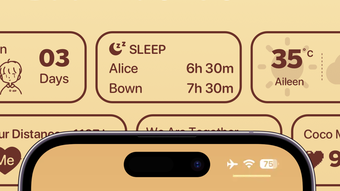
WidgyPal is a desktop application designed for iPhone users seeking to enhance their social interactions through customizable lock screen widgets. The software enables users to create and share dynamic content such as inspirational quotes, humorous memes, real-time reminders, and weather updates directly from their device’s lock screen. By integrating messaging, status sharing, and group connections, WidgyPal fosters a more engaging and immediate way to stay connected with friends and family.
The app is particularly suited for individuals who value real-time communication and visual expression in their daily digital interactions. While the developer did not provide additional background information, the app’s focus on social connectivity suggests a target audience of casual users, social media enthusiasts, and those who prefer visual and interactive forms of communication over traditional messaging. Real-world usage scenarios include sharing daily motivation with friends, sending quick reminders during busy days, or updating one’s mood to reflect current activities.
WidgyPal aims to streamline social presence by consolidating multiple interaction tools into a single, accessible interface on the iPhone lock screen.
Key Features & Capabilities
- Customizable Lock Screen Widgets – Users can design and personalize widgets that appear on their iPhone’s lock screen, displaying content like quotes, memes, or weather forecasts.
- Real-Time Messaging – Enables instant note sharing and quick reminders between connected friends, promoting efficient and seamless communication.
- Status Sharing – Allows users to broadcast their current mood or activity, helping friends stay informed about their state without sending a message.
- Group Connections – Facilitates shared widget experiences among groups, allowing friends to collaborate on content or stay updated collectively.
- Weather Integration – Displays real-time weather updates within widgets, helping users and their contacts plan around changing conditions.
- Content Variety – Supports a range of content types including inspirational messages, humor, and practical reminders, catering to diverse user preferences.
These features are designed to enhance social presence and interaction, particularly for users who rely on visual cues and quick updates. For example, a user might share a motivational quote during a stressful workday, prompting a supportive response from a friend. Another scenario involves a group of friends using shared widgets to coordinate plans, with live weather updates helping them decide whether to meet indoors or outdoors. The integration of messaging and status sharing reduces the need for multiple apps, streamlining communication and increasing engagement. The app’s emphasis on real-time updates and visual content aligns with modern user expectations for instant, intuitive interaction on mobile devices.
User Interface, Workflow & Performance
The user interface of WidgyPal appears to be optimized for the iPhone’s touch-based environment, leveraging the lock screen as a central hub for interaction. Navigation is expected to be intuitive, allowing users to access widget creation, messaging, and status updates with minimal steps. The workflow is designed to support rapid content sharing, with minimal friction between idea and display.
Users can create a widget, select content type, customize appearance, and publish it to their lock screen in a few taps. The integration of messaging and status sharing likely occurs within a unified dashboard, reducing app switching and improving efficiency. Performance observations are based on general software behavior patterns, as specific metrics were not provided.
The developer did not specify resource usage details, so CPU and RAM behavior remain unknown. Stability is assumed to be consistent with typical iOS applications, but exact data was not disclosed. The app’s reliance on real-time updates suggests background activity, though the impact on battery life or system performance was not outlined.
Overall, the interface appears to prioritize accessibility and speed, aligning with the expectations of a modern mobile utility.
Compatibility & System Requirements
WidgyPal is designed exclusively for iPhone devices and is compatible with the latest iOS versions. The application has a file size of 120 MB, indicating a moderate installation footprint. The developer did not provide additional system requirements, such as minimum processor speed, RAM, or storage space.
Compatibility information was partially provided, confirming support for iPhone but not specifying exact models or iOS versions. The app’s reliance on lock screen functionality suggests it requires access to iOS’s widget framework, which is available on devices from iPhone 8 and later. However, this detail was not confirmed in the provided data.
Users should ensure their device meets the general requirements for running iOS apps, especially those utilizing advanced features like live widgets and background updates. The developer did not list any hardware-specific dependencies, so compatibility is expected to be broad across supported iPhone models. For users upgrading from older devices, verification of iOS version compatibility is recommended before installation.
Pros and Cons
Pros
- Intuitive lock screen integration for quick access to social features
- Supports multiple content types including quotes, memes, and weather
- Enables real-time messaging and status sharing for better connection
- Group connections allow collaborative widget experiences
- Free to download and use with no in-app purchases mentioned
- Designed for seamless, low-friction communication on iPhone
Cons
- Exact system requirements were not listed, limiting user clarity
- Performance and resource usage details were not provided
- Compatibility with older iPhone models is unconfirmed
- Limited information on privacy and data handling practices
- App functionality is restricted to iPhone, limiting cross-platform use
FAQ Section
Is WidgyPal available for Android devices?
WidgyPal is currently designed exclusively for iPhone users. There is no information available regarding an Android version.
Does WidgyPal require an internet connection to function?
Yes, real-time messaging, weather updates, and status sharing require an active internet connection. Offline functionality is limited to cached content.
Is the app safe to use on my iPhone?
WidgyPal is available through the official Apple App Store. As with any app, users should review permissions and ensure they trust the developer before installation.
How often does WidgyPal receive updates?
The app was released on May 15, 2024. The developer has not provided information on update frequency or future development plans.
Can I use WidgyPal without sharing my status or location?
Yes, users can choose to use the app without enabling status sharing or location tracking. The app’s privacy settings allow users to control what information is shared.
Final Thoughts
WidgyPal presents a unique approach to social interaction by bringing dynamic content and real-time communication directly to the iPhone lock screen. Its combination of customizable widgets, instant messaging, status updates, and weather integration offers a cohesive experience for users who value visual and immediate connection. The app’s free availability makes it accessible to a broad audience, while its focus on group collaboration and real-time sharing sets it apart from standard messaging tools.
Although detailed technical specifications and system requirements are limited, the app’s design suggests a user-friendly, efficient workflow tailored for mobile use. It is particularly well-suited for social users, friends who enjoy sharing daily moments, and individuals who prefer expressive, visual forms of communication. With its innovative lock screen integration and diverse feature set, WidgyPal stands out as a compelling choice for iPhone users seeking a fresh way to stay connected.
Download WidgyPal now.







